
FX File Explorer: Plus License
NextApp, Inc.Business
4.1345.00 Reviews
- Version
- Varies With Device
- Installs
- 100.00K
- Age Rating
- Everyone
Screenshots
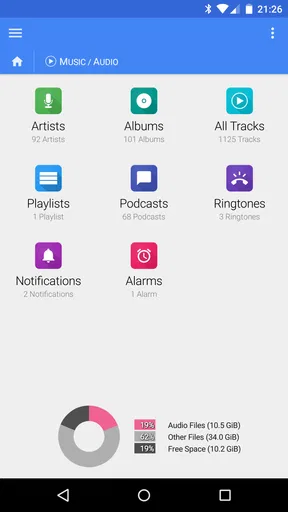

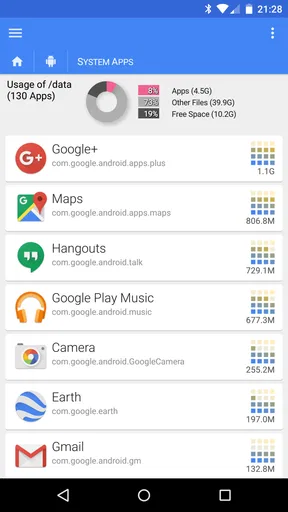
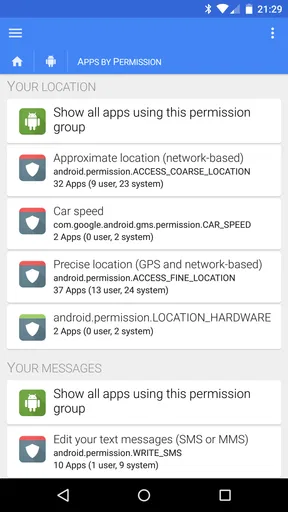
Our Review of FX File Explorer: Plus License
 Analysis by Appyee
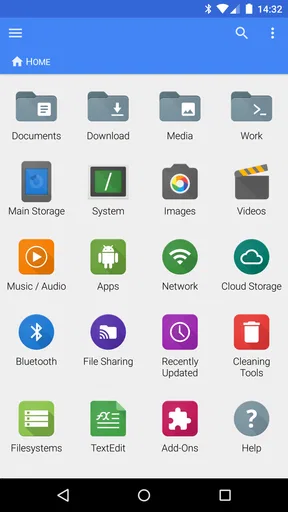
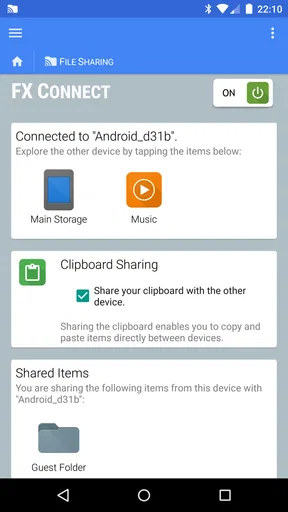
I find the most interesting thing about FX File Explorer: Plus License is the way it extends a file manager beyond folders stored on a phone. This is a paid Business app from NextApp, Inc., priced at $2.99, and its central appeal is having media, networking, and cloud capabilities alongside everyday file handling. That matters most when files are spread across places and you want to work with them from one familiar starting point.
One place to work with files
A basic file browser is enough if all you need is to locate a download or delete an old document. The Plus License is aimed at a broader routine: moving between local files, shared locations, and cloud storage without treating each as a separate task. I like that distinction, because it gives the paid add-on a practical purpose rather than making it feel like a cosmetic upgrade.
In day-to-day use, the benefit is less about a flashy feature and more about fewer context switches. If I need to find a document, compare it with another file, then move a copy somewhere else, having those locations available within the same file-management workflow can save time. It also makes it easier to keep track of where a file actually lives, which is useful when a phone has accumulated downloads, work documents, photos, and offline copies.
The app is rated for Everyone, so its intended audience is broad, but I think the Plus License makes the most sense for people who already use FX File Explorer and regularly need its expanded capabilities. If you only open a file manager occasionally, the extra reach may not change your routine enough to justify paying for it.
Working across locations in practice
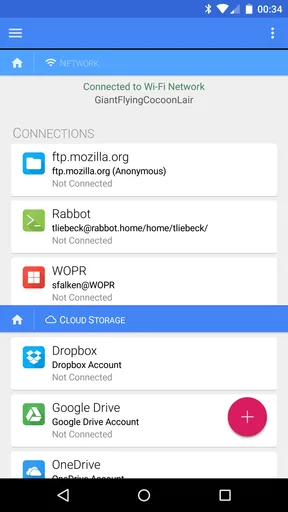
The clearest practical advantage is being able to approach cloud and network files as part of file management rather than as an entirely separate chore. For example, I might be preparing a document on my phone, checking a locally saved copy, and then placing the finished version in a cloud location. That sort of sequence is where a more capable file explorer earns its place: I can focus on the files and their destinations instead of repeatedly switching between unrelated apps.
There is a useful habit here: decide which copy is the working version before moving or editing anything. When a phone and cloud storage both contain similarly named files, it is easy to lose track of the newest one. I’d use clear folder names and check the destination before confirming a move, especially for anything important. The app can make access more convenient, but a tidy filing routine still matters.
For a realistic everyday case, imagine finishing a work document while away from a desk. You can locate the file among phone downloads, check the relevant folder, and transfer or access it through the connected storage workflow rather than waiting until you are back at a computer. The benefit is not that every task becomes automatic; it is that the file manager gives you a more direct way to handle the steps on a mobile device.
When the expanded workflow pays off
FX File Explorer has a 4.1 average from around 3,600 ratings, with more than 100,000 installs. Those figures suggest that it has found an audience, but they should not decide the purchase for you. The better question is whether you regularly need to reach beyond local folders. If you do, a unified workflow may be worthwhile; if not, a simpler free file browser could be the more sensible choice.
Compared with the file manager that comes with a phone, this app is appealing when you want more control over where files come from and where they go. Compared with opening each cloud provider’s own app, the advantage is convenience when you are organizing files across locations. The trade-off is that a dedicated provider app may feel more focused for browsing that provider’s content or using its own tools. I would keep those apps for provider-specific tasks and use FX when the job is primarily moving, sorting, or locating files.
The same distinction applies to desktop workflows. A computer remains more comfortable for large batches, detailed renaming, or extended document work. A phone-based explorer is best when you need to deal with a handful of files on the move, not when you want to reproduce every desktop file-management habit on a small screen.
Small workflow choices that help
One non-obvious way to get more from a cross-location file manager is to treat it as a handoff point rather than a permanent archive. Keep active items in a clearly named working folder, then move finished material to its long-term destination. That makes it easier to distinguish files you are still using from files you simply need to retain, and it reduces the chance of leaving several confusing copies in different places.
Another useful approach is to use the dual-pane view for deliberate transfers. Seeing a source and destination together can make folder-to-folder work easier to follow than repeatedly backing out and navigating again. I would still pause to confirm whether I am copying or moving: copying preserves the original, while moving changes where it is kept. That simple check is especially valuable when handling the only copy of a document.
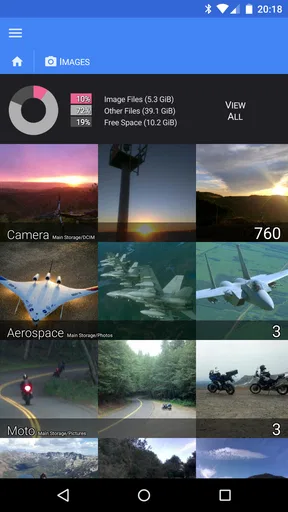
For media, previewing an item before deciding where it belongs can prevent needless transfers. If you are sorting photos or clips, checking the file first helps avoid sending the wrong item to a shared or cloud folder. These small checks make the broader capabilities more useful without turning the app into a substitute for careful file organization.
What to consider before paying
The Plus License costs $2.99, so I would judge it by the time and friction it removes from your own routine. A person who often works with files in cloud or network locations may find the purchase reasonable, especially if the phone is a regular part of their work. Someone who mainly opens downloads, deletes clutter, and occasionally shares a picture may not use the expanded scope enough to notice much difference.
It is also worth separating a license from the underlying file manager. The license adds capabilities to FX File Explorer; it is not a general-purpose cloud service or a replacement for every provider’s app. You still need to know which storage location you are using and how you want files organized. If your priority is simply backing up photos automatically, a dedicated backup tool is a better fit than choosing a file manager for that job.
Another trade-off is that added capability can bring added decisions. A single local folder is straightforward; several storage locations require more attention to destinations, duplicate copies, and connectivity. I see that as a manageable cost for people who need the flexibility, but it is needless complexity for someone who wants a minimal browser with only a few basic actions.
Who gets the most from it
I’d recommend considering the Plus License if you already rely on FX File Explorer and often move between phone storage, cloud files, and network locations. It suits people who handle documents while traveling, keep work and personal files in separate places, or prefer organizing files from one app instead of jumping between several. The app has been available since September 20, 2012, and its established focus is on file management rather than a one-off utility task.
I would skip it if you rarely manage files manually, prefer the default tools on your phone, or need a service designed mainly for automatic syncing and backup. It is also not my first choice for heavy file operations that are more comfortable on a computer. The strongest reason to choose it is a recurring mobile workflow that crosses storage boundaries; without that need, the extra capabilities are easy to leave unused.
One question people often have is whether it is useful without a complicated setup. If your files are mostly on the device, it can still serve as a file manager, but the license’s particular value comes into focus when you make use of the broader media, networking, or cloud side. Another practical question is whether it replaces cloud apps: I would not treat it that way. It helps bring file tasks together, while each provider’s app can remain useful for account-specific browsing and services.
For privacy-conscious users, I would take a measured approach: connect only the locations you actually use and be deliberate about where sensitive files are copied. A file manager can make access easier, but convenience does not remove the need to choose trusted storage and verify destinations. That is a sound habit with any tool handling personal or work documents.
First Impressions
From the moment you open FX File Explorer, it’s clear that the developers put a lot of thought into the design. The interface is clean and intuitive, making it super easy for even the least tech-savvy among us to navigate. What I love most about it is that it doesn’t bombard you with ads or unnecessary pop-ups. It’s just you and your files, exactly how it should be.
Features That Stand Out
One of the standout features for me is the app’s ability to manage files across multiple platforms. Whether you’re working with documents on your phone, tablet, or even your cloud storage, this app can handle it all. The seamless integration with cloud services like Google Drive, Dropbox, and OneDrive means you can access your files from virtually anywhere.
Another feature worth mentioning is the dual-pane view. If you’re like me and often find yourself juggling between folders, you’ll appreciate how easy it is to drag and drop files between two locations without breaking a sweat. It’s like having a personal assistant who’s always one step ahead.
Security and Privacy
In today’s digital age, security is paramount, and FX File Explorer: Plus License doesn’t disappoint. The app offers robust encryption features, ensuring that your sensitive files remain secure. Plus, it doesn’t require unnecessary permissions that other file managers might ask for, so you can use it with peace of mind knowing that your privacy is respected.
Customization and Usability
If you’re someone who likes to have things just so, you’ll appreciate the customization options available. From changing the theme to suit your mood to setting up custom file views, this app lets you tailor your experience to be exactly how you want it. It’s the little things like these that make a big difference in everyday usability.
And let’s not forget about the built-in media player and image viewer. These features allow you to preview files directly within the app, which is a huge time-saver. No more bouncing back and forth between apps just to check a photo or video.
Final Thoughts
All in all, FX File Explorer: Plus License is a powerhouse of a file manager that combines functionality with user-friendly design. Whether you’re a casual user or someone who needs a bit more from their file manager, this app covers all the bases and then some.
So, if you’re on the hunt for a file manager that offers a little bit of everything without overwhelming you, give FX File Explorer a try. It’s like having a Swiss Army knife for your digital life, and once you start using it, you’ll wonder how you ever managed without it.
Verdict
Strengths of FX File Explorer: Plus License
- Intuitive user interface for easy navigation.
- Supports multiple file formats seamlessly.
- Robust cloud storage integration options.
- Advanced search function for quick access.
- Customizable themes to suit user preferences.
Limitations of FX File Explorer: Plus License
- Some features require in-app purchases.
- Lacks integrated media player support.
- Occasional lag with large file transfers.
- No built-in recycle bin for deleted files.
- Limited support for external plugins.
Similar Picks in This Category
View All
LinkedIn: Community & Network
LinkedIn3.8

Zoom Workplace
zoom.com4.1

Microsoft Teams
Microsoft Corporation4.6

Meta Business Suite
Meta Platforms, Inc.4.6

Webex Meetings
Cisco Systems, Inc.4.5

TeamViewer Remote Control
TeamViewer4.4
Frequently Asked Questions
What features does FX File Explorer: Plus License offer compared to the free version?
FX File Explorer: Plus License enhances the basic features of the free version by adding advanced capabilities such as network access, cloud storage support, and file encryption. Users can manage files across FTP, SMB, and WebDAV servers, and integrate with cloud services like Google Drive. Additionally, the Plus License removes ads, providing a smoother user experience.
Is FX File Explorer: Plus License secure for managing sensitive files?
Yes, FX File Explorer: Plus License prioritizes user security with its robust encryption tools. It allows you to encrypt sensitive files and folders, ensuring that only authorized users can access them. The app also supports secure file transfer protocols, offering peace of mind when handling confidential information.
Does FX File Explorer: Plus License support multiple file formats?
Absolutely, FX File Explorer: Plus License is designed to support a wide array of file formats. Whether you are dealing with images, videos, documents, or compressed files, this app can handle them efficiently. It also includes a built-in text editor and image viewer, making it versatile for various file management tasks.
Can I customize the interface of FX File Explorer: Plus License?
Yes, one of the appealing features of FX File Explorer: Plus License is its customizable interface. Users can tailor the layout, themes, and viewing options to fit their preferences. The app supports split-view mode, making file navigation and management more intuitive and user-friendly.
Is there customer support available for FX File Explorer: Plus License users?
FX File Explorer: Plus License offers customer support to its users, providing assistance through various channels. Users can access help through in-app options, FAQs on the official website, or contact support for more personalized assistance. The support team is responsive and dedicated to resolving user issues efficiently.
